
The Lemo TV App allows users to access live TV channels, movies, and series on multiple devices. This guide explains how to download, install, and set up the app correctly.
👉 Looking for the official service? Visit the Lemo TV IPTV official website
The Lemo TV App is an IPTV player application designed to work with an active IPTV subscription. It supports live TV, VOD content, and EPG on compatible devices.
Key highlights:
The Lemo TV App works on most popular devices, including:
⚠️ Always download the app from trusted sources only.
Once installed:
If login fails, double-check your credentials or contact support.
App not loading?
Login error?
Channels buffering?
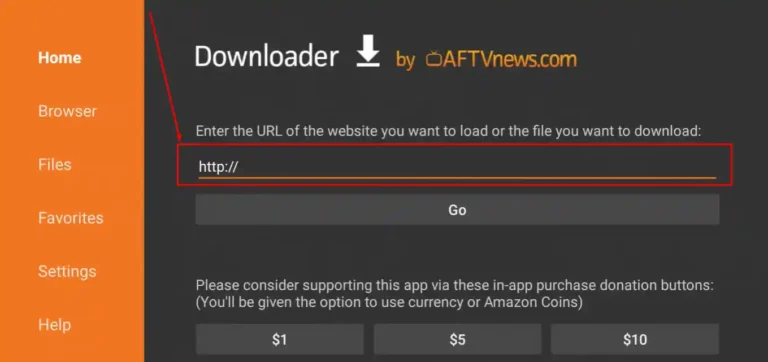
Firestick users can install the Lemo IPTV App easily using the Downloader app by entering the official download code.
Once installed, enter your username and password to load channels.
The app itself is free, but it requires an active IPTV subscription.
This depends on your subscription plan.
No. Content loads only after login with valid credentials.
The Lemo TV App is an IPTV player that allows users to stream live TV channels, movies, and series using login credentials provided by an IPTV service. The app itself does not include content by default.
The Lemo TV App is designed to work with compatible IPTV services. To ensure proper functionality, users should always download the app from trusted or official sources recommended by their provider.
Yes. The app requires an active IPTV subscription. Without valid login details (username and password), channels and content will not load.
The app typically supports:
Always use the login method provided by your IPTV service.
This message usually means:
Double-check your credentials or contact your IPTV provider for confirmation.
Yes. The app supports EPG (Electronic Program Guide) if your IPTV service provides it. EPG availability depends on the provider, not the app itself.
Some versions support basic parental control features such as:
Availability depends on the app version.
Common reasons include:
Try updating the app, clearing cache, or reinstalling it.
If the app is installed correctly but content does not load: