Trusted Lemo TV App — Download Lemo TV APK Latest Version & Login Guide
The official Lemo TV App transforms your Amazon Firestick, Android TV, Smart TV, and mobile devices into a high-speed 4K entertainment hub. Follow this verified guide to download Lemo TV APK (2026 latest version), enter the official Firestick Downloader code, and complete your LemoTV login in under 3 minutes.
5789712
Lemo TV APK Latest Version — Package Specifications
Before you download Lemo TV APK onto your streaming hardware, verify that you are installing the latest official 2026 package from LemoTV Official for maximum playback stability and security.
| Application Name | Lemo TV App (Official IPTV Player) |
|---|---|
| Latest Version | v4.8.2 (2026 Stable Release) |
| Firestick Downloader Code | 5789712 (Mirror: 3839855) |
| Direct APK Download URL | http://aftv.news/5789712 |
| Login Support | LemoTV Login (Username & Password / Xtream API) |
| Supported Resolution | SD, HD, Full HD (1080p), and Ultra HD 4K @ 60fps |
| System Requirements | Android 5.1+, Fire OS 6+, Android TV, Google TV |
What You Need to Start Streaming
Installing the Lemo TV App takes less than 3 minutes, but remember that the player itself is a media interface and does not come pre-loaded with channels without an active account.
- Step 1: Download Lemo TV APK latest version via code 5789712.
- Step 2: Obtain your active LemoTV login username & password.
- Step 3: Sign in once — your live TV guide (EPG) and VOD sync automatically.
🚀 Why Choose the Lemo TV App?
Unlike generic media players that require long M3U playlist links and manual EPG configuration, the custom Lemo TV App is pre-configured for our high-speed streaming servers.
Ultra-Fast Anti-Buffer Playback
Built with hardware-accelerated decoding for Firestick and Android TV, eliminating frame drops and buffering during peak live sports and PPV broadcasts.
20,000+ Live TV Channels
Instant access to US, UK, Canadian, European, Latino, Arabic, and international live television networks organized neatly by country and genre.
80,000+ Movies & Series VOD
An on-demand cinema library updated daily with box-office releases, complete TV series seasons, multi-language subtitles, and 4K/1080p streams.
One-Step LemoTV Login
Forget typing complex portal URLs with a TV remote. Simply open the Lemo TV App, enter your LemoTV login username and password, and stream.
Integrated EPG TV Guide
Browse real-time Electronic Program Guides showing current and upcoming shows across live channels with one-click favorite channel pinning.
Parental Control & Multi-Device
Lock specific categories with a private PIN code and switch effortlessly between your living room Smart TV, Firestick, smartphone, or tablet.
How to Download Lemo TV APK Latest Version (2026 Guide)
Because Amazon and Google restrict third-party IPTV players on their default app stores, the fastest and safest way to install the Lemo TV APK latest version on Firestick and Android TV is via the official Downloader method below.
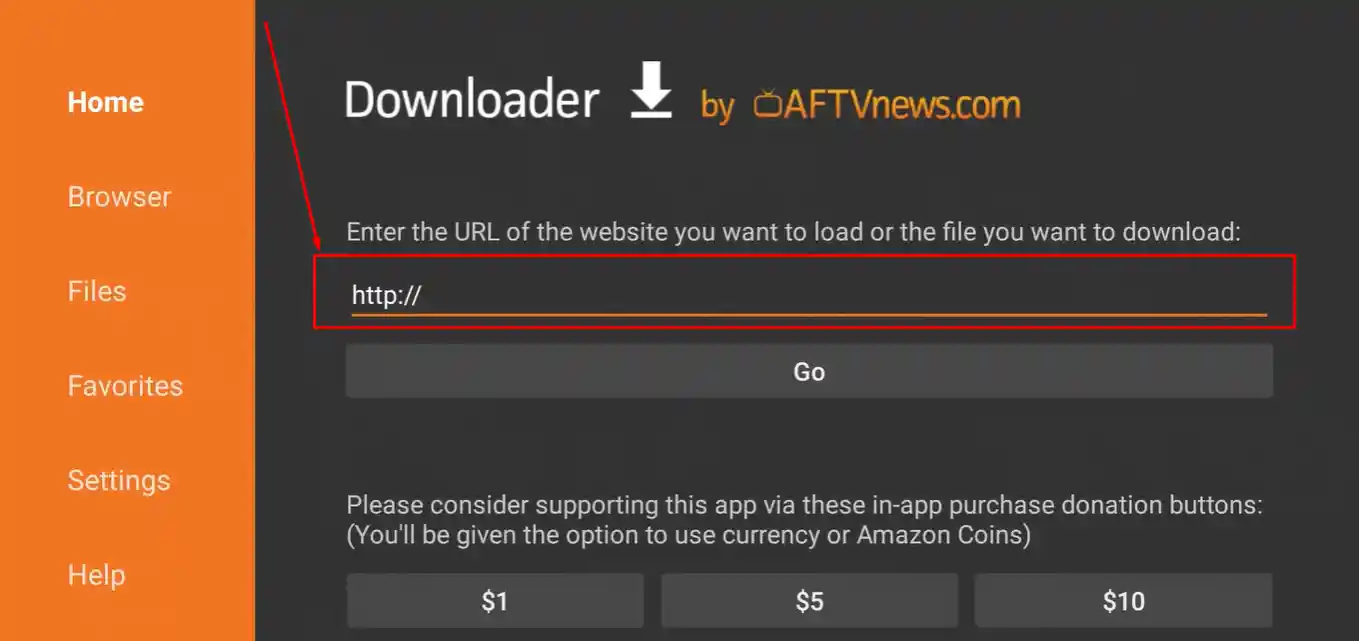
📺 Install Lemo TV App on Firestick (Downloader Method)
🤖 How to Install on Android TV, Google TV & Smartphones
- On Android TV / Google TV / NVIDIA Shield, install the Downloader app from the Google Play Store and enter code 5789712.
- On Android Smartphones & Tablets, tap the direct button below to download Lemo TV APK directly in Chrome, allow installation from your browser, and open the app.
- Sign in with your LemoTV login username and password to load all channels immediately.
How to Complete Your LemoTV Login & Activate Channels
Once you have installed the Lemo TV App, follow these steps to sign in using your official LemoTV login credentials and synchronize your live TV and VOD playlists.
Get Your Credentials
Subscribe to a pass on our Pricing Page or request a Free Trial on WhatsApp to receive your unique username and password.
Launch Lemo TV App
Open the Lemo TV App on your Firestick or Android device. You will be greeted by the clean orange-and-black LemoTV login screen.
Enter Username & Pass
Type your exact Username and Password (case-sensitive). Ensure your TV keyboard does not add an automatic space at the end.
Sync & Stream 4K
Click Login. Within 10–15 seconds, all 20,000+ live TV channels, sports packages, series, and EPG guides will populate.
📱 Devices Supported by Lemo TV
Whether you install the native Lemo TV APK on Android/Fire OS or authenticate with your LemoTV login on Smart TVs and Apple hardware, you can stream on all your favorite screens. Explore our Supported Devices directory for more details.
🔥 Amazon Firestick & Fire TV
100% native compatibility across Fire TV Stick Lite, 4K, 4K Max, and Fire TV Cube. Install directly using Downloader code 5789712.
📺 Android TV & TV Boxes
Runs natively on NVIDIA Shield TV, Chromecast with Google TV, Xiaomi Mi Box, Formuler, ONN 4K Box, and Sony/TCL/Hisense Android TVs.
📱 Android Phones & Tablets
Download the Lemo TV APK latest version directly to any Samsung Galaxy, Google Pixel, or Android tablet for portable HD streaming.
🖥️ Samsung & LG Smart TVs
For Samsung (Tizen) and LG (webOS) TVs, use your LemoTV login via Xtream Codes inside compatible Smart TV apps like IPTV Smarters or IBO Player.
🍎 Apple TV, iPhone & iPad
iOS and tvOS users can log in seamlessly using their Lemo TV credentials on Smarters Player Lite, GSE Smart IPTV, or iPlayTV from the App Store.
💻 Windows PC & MacBook
Stream on desktop computers and laptops using IPTV Smarters Pro for Windows/macOS, VLC Media Player, or MyIPTV Player with your account login.
🛠️ Common Lemo TV App Issues & Instant Fixes
Experiencing a login error, buffering channel, or installation prompt? Use these verified technical solutions to restore smooth playback in seconds.
1. LemoTV Login Error / "Account Expired"
- Check Case Sensitivity: Passwords and usernames are strictly case-sensitive. Verify uppercase and lowercase letters carefully.
- Remove Trailing Spaces: Firestick on-screen keyboards often add an extra space after a word. Press backspace once if needed.
- Verify Active Status: Confirm your subscription has not ended. You can renew anytime on our Pricing Page.
2. Channels Buffering or Freezing
- Internet Speed: Maintain a stable connection of at least 15–25 Mbps for Full HD and 4K channels.
- Clear App Cache: Go to Firestick Settings → Applications → Manage Installed Applications → Lemo TV → Clear Cache.
- Restart Router & Device: Unplug your streaming stick and Wi-Fi router for 60 seconds to refresh DNS routing.
3. APK Won't Install ("App Not Installed")
- Enable Unknown Sources: Ensure Install Unknown Apps is switched to ON for the Downloader app under Developer Options.
- Free Up Storage Space: Delete unused apps or old APK files inside Downloader if your Firestick has less than 500 MB free space.
- Uninstall Older Build: Before installing the Lemo TV APK latest version, uninstall any outdated version first.
4. App Not Loading or Crashing on Startup
- Update to Latest APK: Re-download using code 5789712 (or mirror code 3839855) to ensure you have the 2026 patch.
- Force Stop & Relaunch: In your device Application settings, select Force Stop on the Lemo TV App and reopen it.
- 24/7 Live Assistance: Contact our technical team directly via WhatsApp Support.
Frequently Asked Questions About the Lemo TV App
Everything you need to know about downloading the APK, device support, and managing your LemoTV login.
Is the Lemo TV App free to download?
Yes, the Lemo TV App is 100% free to download and install on your Firestick, Android TV, or smartphone. However, the app does not include built-in channels on its own—it requires an active Lemo TV IPTV subscription and valid LemoTV login credentials to load live TV and VOD content.
How do I download the Lemo TV APK latest version on Firestick?
To download Lemo TV APK latest version on Firestick, install the free Downloader app from the Amazon Appstore, enable Install Unknown Apps in Developer Options, and enter the official Downloader code 5789712 (or backup code 3839855). You can also download the APK directly via http://aftv.news/5789712.
Which login methods does the Lemo TV App support?
The official Lemo TV App supports direct LemoTV login using the Username and Password provided upon ordering. For third-party apps on Smart TVs or iOS, we also provide full Xtream Codes API (Server URL, Username, Password) and M3U playlist credentials.
Do I need a subscription before using the Lemo TV App?
Yes. Without active login credentials, the player cannot load any streams. You can request a 24-hour free trial on WhatsApp to test the app first, or choose a 1, 3, 6, or 12-month pass on our Pricing Page.
Does the Lemo TV App include EPG (TV Guide) and Parental Controls?
Yes! Once you complete your LemoTV login, the Electronic Program Guide (EPG) automatically loads program schedules for live channels. The app also includes built-in PIN protection so you can lock specific channel folders or adult content.
Why does the Lemo TV App say "Account Expired" or fail to log in?
This usually means either your subscription period has ended, or there is a slight typo in your username or password. Double-check letter capitalization, make sure your internet connection is active, or message our support team to verify your line status.
Can I become a Lemo TV Reseller and use this app for my clients?
Absolutely. Our Lemo TV IPTV Reseller Program gives you a dedicated management panel where you can generate free trials and active LemoTV login accounts for your customers to use directly inside the Lemo TV App.
Download the Lemo TV App & Get Your Instant Login Today
Install the Lemo TV APK latest version using Firestick Downloader code 5789712, grab your LemoTV login, and unlock 20,000+ live channels and 80,000+ movies & series with zero buffering.